
Translate manhwa into your language on Android.
Open a manhwa, manga, or manhua chapter, choose your language, and read the translated text directly on the page.
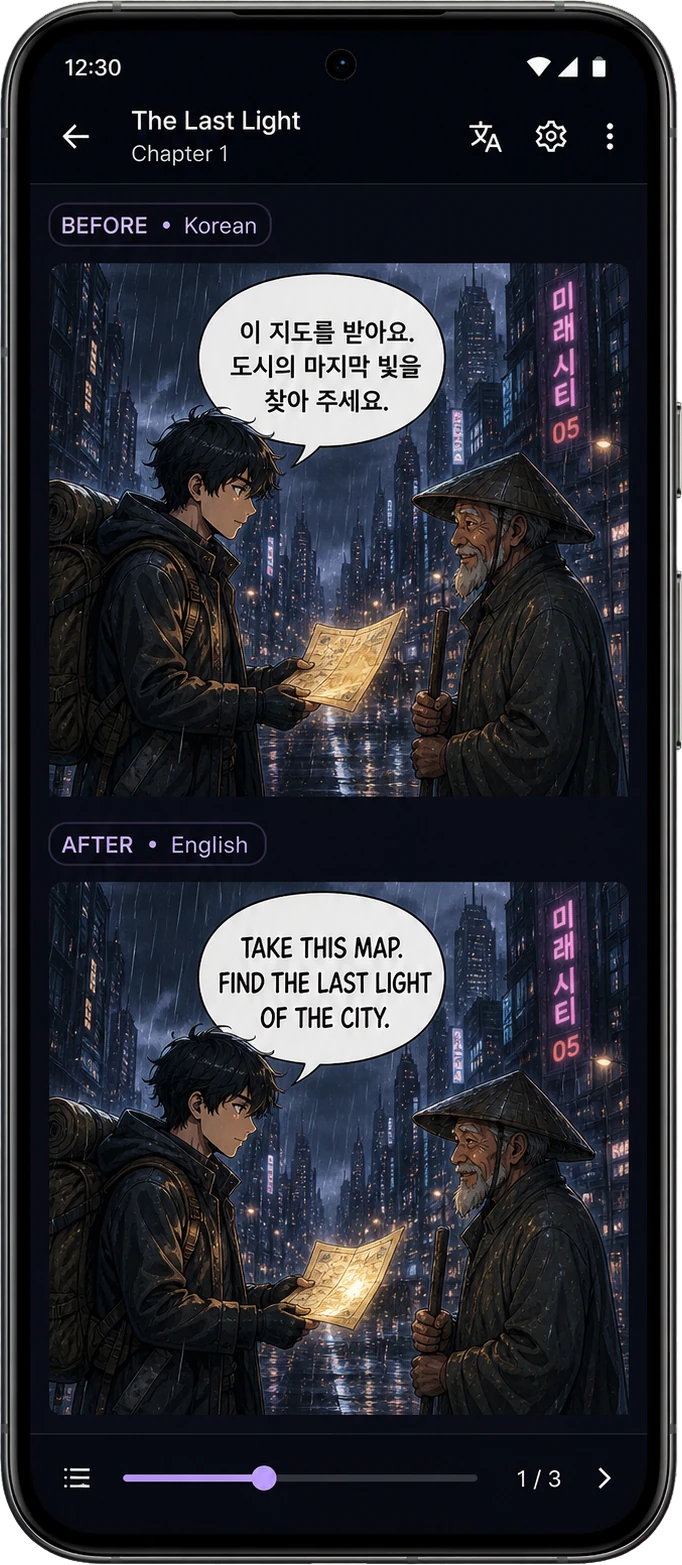
Read the original and the translation in the chapter
The text is translated where it appears on the page, so you can follow the scene without leaving your reader or copying speech bubbles one by one.
From download to a translated chapter
You do not need to be a developer. The whole setup happens inside a familiar Android reader.
A manhwa-first translator that also works with manga and manhua
Nayovi is especially comfortable for long vertical manhwa chapters, while keeping the Android workflow familiar to readers who know TachiyomiAT, Tachiyomi, or Mihon.
Choose tokens for your reading
Use a one-time token pack for hosted translations inside the Android reader.
A simple path to keep reading
Test a real chapter first. When you need more translations, compare the token packs and choose the reading volume that suits you.
What readers ask about translating manhwa
The essentials before you install Nayovi on Android.
Translate your next manhwa chapter in Nayovi
Download the official Android APK, choose your language, and see how the translation feels on a real chapter.